EduMate AI
For teachers · Free to use · No sign-up needed

Clear AI rules for every assignment.

Classroom-ready AI resources for grades 6–12. Help students understand when AI is allowed, what work must be their own, and how to check AI answers.

Good guidance should still make sense when the bell rings.

Created by Anakha Vijayan, AIGP, a certified AI governance professional and former secondary school math and science teacher.

Before and after

See what clear AI guidance looks like.

Pick an assignment type. The left side is a typical instruction. The right side is the same assignment with clear limits, built by the same logic as the card maker.

Before

Students are left to guess what "responsibly" means.

After

Free resources

Free classroom resources

Free to use, with no sign-up. Each one comes as a print-ready PDF and an editable Word file you can adapt with your own name, class and rules.

Poster · All subjects

"Can I Use AI on This?" Poster

The five AI Levels on one colorful page for your classroom wall.

Use this when students need a quick reminder of the AI Levels.

1 page · print-ready PDF · editable Word

Policy · All subjects

Classroom AI Use Policy

A two-page editable policy with rules, an AI Use Statement for students and consequences you can adapt.

Use this at the start of the year to set expectations.

2 pages · print-ready PDF · editable Word

Checklist · For teachers

AI Tool Checklist

28 Yes, No or Unsure questions with space for evidence, so you can bring a tool to your district for review.

Use this before you bring a new AI tool into class.

4 pages · print-ready PDF · editable Word

Families · All subjects

Parent Letter and Student Agreement

A friendly letter explaining your AI rules, with a sign-and-return acknowledgment of classroom expectations.

Use this to tell families what to expect from AI in class.

2 pages · print-ready PDF · editable Word

Student form · All subjects

AI Use Statement

A one-page form where students name their AI Level, the tool they used, how they used AI and what they checked.

Use this when students must show how they used AI.

1 page · print-ready PDF · editable Word

Student worksheet · All subjects

Spot the AI Mistake

Five AI answers from different subjects, each with one mistake. Students find the error, correct it and show how they checked it. Includes a teacher answer key.

Use this to practice checking AI answers, across subjects.

3 pages · print-ready PDF · editable Word

AI Use Card builder

Make an AI use card for my assignment

  1. Fill in the form. Pick the basics, then what AI may help with.
  2. Check your card. It updates as you go. Click any text on it to edit.
  3. Copy it to your LMS or download it. Free, with no sign-up and no student information needed.
Students may use AI to…

Your AI Level is set by the most advanced option you pick. Pick none for a no-AI assignment (Level 0).

Click any text on the card to edit it. Edited sections are marked, and they stay as you wrote them when you change the form.
Science · Grades 9–12 · Lab report

Lab Report: Fair Test

Level 2

Goal:

AI may help with

    You must do yourself

      Do not use AI to

        Show your work

        CHECK before you trust AI

          Use only school-approved, age-appropriate AI tools. Never put your own or anyone else's personal information into an AI tool.

          Build, edit, copy and download as many cards as you like. Everything is free. Drafts are saved in this browser only.

          Our approach

          Teach students to CHECK before they trust

          AI is very good at sounding right. That isn't the same as being right. Every EduMate classroom resource builds the same five habits.

          C

          Compare

          Does a reliable source say the same thing?

          H

          Hunt for sources

          If AI names a source, look it up. Does it really exist?

          E

          Explain it yourself

          If you can't explain it in your own words, you don't understand it yet.

          C

          Consider bias

          Whose view is included? Whose might be missing?

          K

          Know your AI Level

          Is AI allowed on this assignment, and how? Not sure? Ask first.

          Classroom decisions

          What would you allow?

          Choose what you would allow in each situation. There is no score. Each choice shows a short explanation and a boundary you could use.

          For schoolsHelp your staff put responsible AI guidance into practice.
          For schools

          Support for your school, if you want it

          If your school would like hands-on help, I can run a session or help plan a policy. Nothing here is required.

          Staff workshop · 90 minutes

          Responsible AI Foundations for Schools

          A live session for staff, in person or online, with slides and printable AI Levels posters and family letters for every teacher.

          Who: whole staff or a department, grades 6–12
          Booked 2–3 weeks ahead

          Leadership · About 4 weeks

          School AI Policy Setup

          A school-wide AI policy drafted with your leadership team, plus an approved-tools process and a family communication plan.

          Who: principals and leadership teams
          2–3 working meetings

          Custom · Department or district

          Tailored Sessions

          A session built around your subjects and questions, with optional follow-up coaching.

          Who: departments, grade teams and districts
          Planned with you, usually within a month
          Request a workshop quoteEmail your school name, group size and preferred dates, and I will reply with options. Pricing depends on group size and format.
          See what the 90 minutes looks like
          1. How AI works, and why it gets things wrong15 min
          2. Where AI helps teachers, and the risks15 min
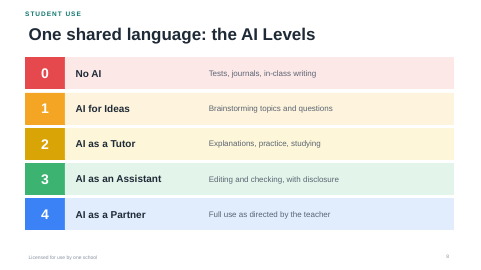
          3. The AI Levels: one shared language for students15 min
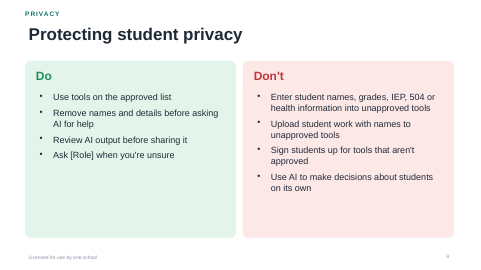
          4. Student privacy and choosing safe tools15 min
          5. Academic integrity without AI detectors10 min
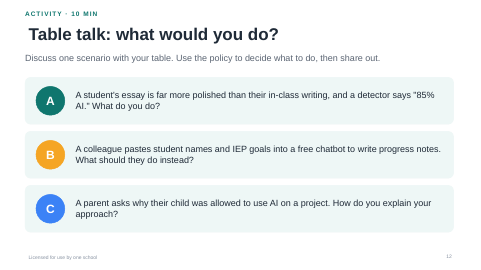
          6. Table talk: real classroom scenarios15 min
          7. Your three next steps5 min
          Workshop slide showing the five AI Levels Workshop slide with do and don't lists for student privacy Workshop slide with three table-talk scenarios
          For schools

          Check an AI tool before your school uses it

          Considering an AI tool for students? I can review it against a 28-point checklist and send your team a plain-language report. Your district makes the final decision.

          Who it's for
          Principals, technology coordinators and teachers choosing tools
          You get
          A written report covering 7 areas and a clear recommendation (recommend for district review, recommend with conditions, or not now). Final approval stays with your district.
          Timeline
          Report within 5 business days
          • 1Purpose and learning value
          • 2Approval and policy fit
          • 3Student privacy and data use
          • 4Age limits and accounts
          • 5Accuracy, bias and safety
          • 6Access and fairness
          • 7Transparency
          Ask about a reviewSend the tool's name and how you plan to use it.

          Sample report

          Recommend with conditions

          A fictional example showing the report format.

          Learning valueStrong
          Uses student input for trainingNo
          Minimum age13+ with consent
          Accuracy in testingSome errors
          Personal accounts requiredYes

          Recommendation: send to the district for review; if approved, use teacher-led only, with no student accounts, until a data agreement is signed.

          Reviews support, and do not replace, your district's policies or legal guidance.

          About

          Hi, I'm Anakha Vijayan.

          I am a former DCPS high school science teacher with seven years of teaching and training, and an AI governance professional with the IAPP AIGP credential.

          I hold a postgraduate diploma in e-learning design and training development, so the guidance I write is designed to be taught, not just filed. I write practical AI guidance for schools: policies, classroom AI-use rules and checks for AI tools. My independent governance projects are public on GitHub.

          Certifications
          IAPP Artificial Intelligence Governance Professional (AIGP), 2026
          Cybersecurity: Protecting Your Digital Future, Asian Development Bank Institute (ADBI), 2026
          AI, Justice and the Rule of Law, University of Oxford with UNESCO, 2026
          Independent work
          AI governance projects, public on GitHub
          Training
          Certified trainer, e-learning developer (25 onboarding modules) and subject matter expert for education companies
          Education
          BS–MS in Mathematics and Biology, IISER Thiruvananthapuram; postgraduate diploma in e-learning design, Lambton College
          Contact

          Questions? Get in touch

          Questions and school requests

          Email me with your school name, what you're looking for and your preferred dates.